The Plants Pots Stamp Set for Creative Projects
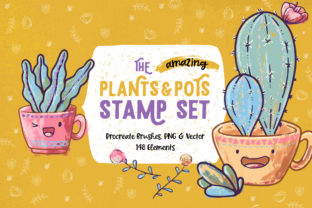
Creating illustrations, patterns, or journal layouts often starts with the same question: where do you find versatile, time-saving assets that still feel personal? The Plants Pots Stamp Set offers a practical answer for anyone who regularly works with visual content—whether you are a digital artist, a small business owner preparing product mockups, or a hobbyist decorating a bullet journal. This collection includes 148 individual elements available as Procreate brushes, PNG files with transparent backgrounds, and vector files in AI and EPS formats. The range of file types means that your preferred workflow, software, or device does not limit what you can build.
What the set includes and why file variety matters
Having 148 unique stamps might sound like a large library, but what makes it genuinely useful is how each element can work alone or combine with others. The stamps cover plants in different pots, individual leaves, flowering stems, and decorative containers. Because the set includes Procreate brushset files, PNG images with transparent backgrounds, and vector formats (AI and EPS), you are not locked into one ecosystem. If you work on an iPad with Procreate, you install the brushset and tap to stamp directly onto your canvas. If you use another application—Photoshop, Affinity Designer, Illustrator, or even a free program like GIMP—the PNG and vector files give you the same stamps without needing a specific app.
For someone who values speed and reliability, the Procreate brushset is a clear advantage. Each stamp becomes a brush that you select, tap, and adjust in size or rotation. There is no importing, placing, or masking. For a user who prioritizes flexibility, the PNG files with transparent backgrounds let you drag and drop into any document, resize without losing clarity, and layer them over photos or textures. The vector files (AI and EPS) serve a different purpose entirely: they allow infinite scaling, color editing, and stroke adjustment without pixelation. If you are designing a large banner or a logo variation, vectors preserve crisp lines at any size.
How different creators actually use these stamps
A single stamp set can be interpreted very differently depending on your goals and existing skills. The sections below explore how various audiences might approach the same collection and what they would prioritize.
Digital artists and illustrators seeking speed
If you create illustrations regularly, you know that drawing every single leaf or pot from scratch eats into the time you could spend on composition, shading, or storytelling. The Plants Pots Stamp Set works as a shortcut that still lets you customize. You can stamp a basic pot, then paint over it, adjust its color with clipping masks, or layer several stamps to build a complex arrangement. Because Procreate stamps respond to pressure and tilt if you set them up that way, they behave like real brushes rather than static stickers. This feels natural for someone who already thinks in terms of brush strokes rather than image imports.
Experienced illustrators often use stamp sets to create repeating patterns or to populate backgrounds quickly. Instead of drawing the same succulent five times, you stamp it, rotate it slightly, scale it down, and stamp again. The result looks hand-drawn but takes a fraction of the time. If you are working on a client project with a tight deadline, that efficiency matters.
Hobbyists and bullet journal enthusiasts
Not everyone who buys a stamp set is a professional designer. Many adults in their 20s to 50s use bullet journals, planners, or personal notebooks as a creative outlet or a way to manage their schedules. Drawing complex plants with a pen can be intimidating if you do not consider yourself an artist. The PNG stamps solve that problem directly. You print them onto sticker paper or use a cutting machine to create physical stickers, then place them into your journal. The transparent background means they blend into any page color or pattern.
If you prefer digital planning on an iPad, the Procreate brushset lets you open a planner PDF in Procreate and stamp directly onto the page. You can resize the stamp to fit a weekly spread or a habit tracker. The cost of buying a stamp set like this is much lower than purchasing individual sticker packs repeatedly, and you have control over the size and placement yourself.
Small business owners and product creators
For someone selling physical or digital products, presentation can make the difference between a browser and a buyer. The Plants Pots Stamp Set helps you create mockups, product labels, or social media graphics without hiring a designer. If you sell handmade candles, you could use the stamps to design a small plant illustration for your labels. If you sell digital planners, you could include plant stamps as a bonus asset for your customers.
The vector files become especially relevant here. AI and EPS formats allow you to change the color of a stamp to match your brand palette exactly. You can also scale a stamp to fit a product tag or a website header without resolution loss. For a small business owner who is not a trained graphic designer, having vector files means you can ask a printer or a packaging company to use the artwork directly without reformatting. This reduces friction and keeps your production process simple.
Educators and content creators
Teachers, workshop facilitators, and online content creators often need visual assets that are clear, consistent, and reusable. If you create worksheets, presentation slides, or tutorial videos, plant illustrations can make your materials feel more polished and approachable. The PNG format is especially useful here because you can insert stamps into Google Docs, Canva, Keynote, or PowerPoint without worrying about background boxes or awkward white borders.
For someone running a small creative workshop, you could use the stamps to demonstrate pattern design, color theory, or composition. Participants can see how stamp elements combine into a full illustration without needing advanced drawing skills. The set also doubles as a teaching tool for software skills: you can show learners how to install a Procreate brushset, how to use PNG files with transparent backgrounds, or how to edit vector stamps in Illustrator.
Marketers and bloggers
Blog posts, email newsletters, and social media cards all benefit from consistent visual branding. A set of plant stamps gives you a library of elements that share a similar style, so your graphics feel cohesive even when you create them quickly. If you publish recipes, lifestyle tips, or productivity guides, small plant illustrations add warmth without distracting from the text.
Because the set includes both detailed stamps (flowering plants, layered leaves) and simpler ones (basic pots, single stems), you can choose the right level of detail depending on the format. A small icon for a blog sidebar needs less complexity than a full-page pattern for an ebook cover. Having both options in one purchase saves time compared to searching for individual assets across multiple sites.
What to consider before purchasing
No single product fits every workflow perfectly, so it helps to check a few practical details before deciding. First, confirm that the file format you need is included. If you use Procreate, the brushset is the main draw. If you do not own Procreate, the PNG and vector files still give you full access to the 148 elements—you simply install and use them differently than a brushset user would.
Second, think about how you prefer to organize assets. A stamp set with 148 brushes means you have a large library in your brush panel. Some users enjoy having everything in one place. Others prefer to keep a separate folder of PNGs and import them only when needed. Both approaches work, but knowing your own habit will help you use the set efficiently from day one.
Third, consider whether you will use the stamps for commercial projects. Many stamp sets come with a license that allows personal and commercial use, but the terms vary. If you plan to sell products that include the stamps (like stickers, templates, or printed goods), check the licensing information provided with your purchase. The same applies if you plan to share the files with students or team members.
Finally, assess your comfort with editing the stamps. The vector files open up color and shape editing, but only if you have software that supports AI or EPS formats. If you do not own Illustrator or Affinity Designer, you might rely on the PNG files or the Procreate brushes instead. That is not a limitation—PNGs with transparent backgrounds are highly usable—but it changes how you can customize the elements.
Who benefits most from this set
The Plants Pots Stamp Set is a strong match for creators who value flexibility across different tools. If you switch between an iPad and a desktop computer, or between Procreate and a design app like Photoshop, having PNG and vector files alongside brushes means your assets stay accessible. It also suits people who want to create quickly without sacrificing quality. The stamps are already drawn, separated, and tested. You do not need to clean up edges or remove backgrounds.
For someone who is still learning digital art or design, this set offers a low-pressure entry point. You can focus on composition, color, layout, or storytelling without worrying about drawing every plant from scratch. As your skills grow, you may start editing the stamps more heavily or combining them with your own hand-drawn elements. The set supports that progression because it does not force you into one way of working.
For experienced professionals, the value lies in efficiency and consistency. Client projects often require multiple assets that look like they belong together. With a single stamp set, you have 148 elements that share a unified style. You can create an entire pattern, a mood board, or a series of social cards without mixing assets from different sources that clash visually.
Regardless of your skill level or use case, the decision comes down to whether you regularly need plant-themed visuals and whether the time saved justifies the purchase. If you have ever spent an hour hunting for a free PNG of a potted plant only to find it has a visible white edge or a mismatched style, a curated set like this removes that frustration entirely. The 148 stamps give you more than enough variety to cover most projects, and the multiple file formats ensure that you can actually use them in the software you already own.